Get Found on Google Maps! Your Easy Guide to Creating a Google Business Profile in South Africa.
In today’s South African business landscape, being visible online isn’t just an option – it’s a fundamental requirement for growth and survival. With the vast majority of consumers turning to Google for everything from finding the nearest coffee shop to locating a specialist service, your presence on Google Maps and Search is absolutely critical. If your business isn’t showing up when potential customers are actively searching in your area, you’re missing out on invaluable opportunities.
Table of Contents
Imagine this: someone new to Pretoria is looking for a reliable car mechanic. They pull out their smartphone, open Google Maps, and type “car mechanic near me.” Will your workshop appear in the results? Or will they scroll past, never knowing your business existed? The difference between being found and being invisible often boils down to one simple, free tool: a Google Business Profile (GBP).
This comprehensive guide will walk you through the easy steps to create and optimise your Google Business Profile, ensuring your South African business shines brightly on Google Maps and Search.
Why Your South African Business NEEDS a Google Business Profile
Before we dive into the “how,” let’s reinforce the “why.” A Google Business Profile is more than just an online listing; it’s your digital storefront, your 24/7 receptionist, and a powerful marketing tool rolled into one.
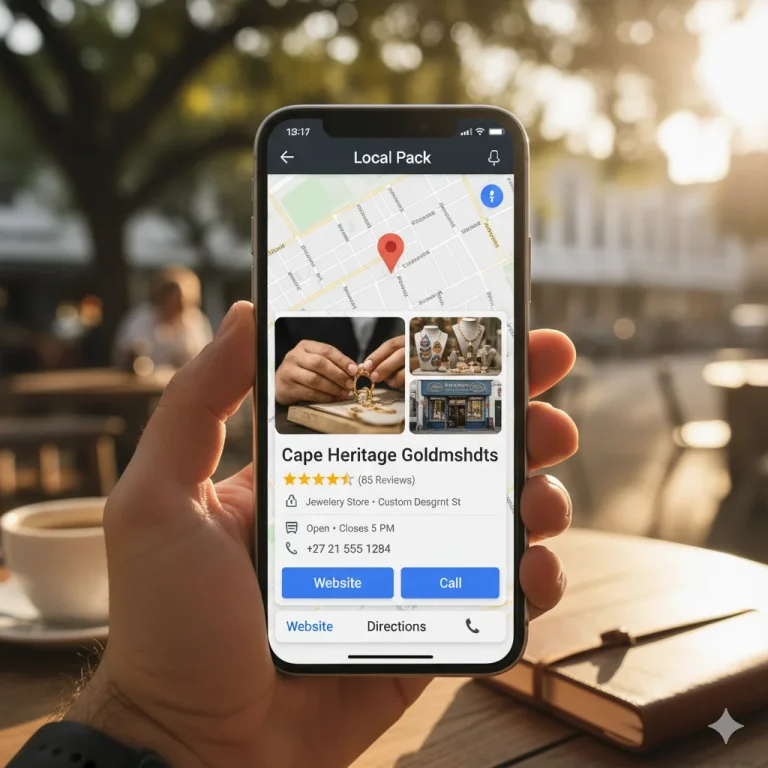
- Dominate Local Search Results: When users search for local products or services (e.g., “bakery Cape Town,” “electrician Durban”), Google prioritises displaying businesses with well-optimised GBPs. These often appear in the coveted “Local Pack” – a prominent block of three businesses shown at the top of search results, complete with a map. This is prime digital real estate!
- Appear on Google Maps: This is perhaps the most direct benefit. Customers can easily find your physical location, get directions, see your operating hours, and even call you with a single tap, all directly from Google Maps. Crucial for any business with a physical presence.
- Build Trust and Credibility: A complete, accurate, and regularly updated GBP signals professionalism and reliability. With your address, phone number, website, and photos readily available, customers instantly gain confidence in your business.
- Leverage Customer Reviews: Genuine reviews from satisfied customers act as powerful social proof. A strong collection of positive reviews on your GBP can significantly influence purchasing decisions and give you a platform to engage directly with your clientele.
- Direct Communication Channels: Your GBP provides multiple ways for customers to connect: a click-to-call button, a link to your website, and even a messaging feature (if enabled). This frictionless communication path encourages immediate engagement.
- It’s Completely FREE: There’s no cost to create and maintain your Google Business Profile. It offers an incredible return on investment for businesses of all sizes across South Africa.
Your Step-by-Step Guide to Creating a Google Business Profile
Ready to put your South African business on the map? Let’s get started!
Step 1: Sign In or Create a Google Account
You’ll need a Google account (Gmail address) to manage your Google Business Profile.
- Go to business.google.com.
- If you’re already signed in to a Google account, it will use that. If not, sign in or create a new account.
Step 2: Enter Your Business Name
- On the initial screen, type your business name into the search bar.
- If your business is already listed (perhaps an old listing or someone else created it), select it. You might need to request ownership.
- If your business isn’t listed, select “Add your business to Google.”
Step 3: Choose Your Business Type
Google will ask what kind of business you manage:
- Online retail: If you only sell products online and don’t have a physical store.
- Local store: For businesses with a physical shop or office where customers visit.
- Service-business: For businesses that visit customers (e.g., plumbers, electricians, landscapers) and might not have a public storefront.
Most South African businesses will fall under “Local store” or “Service business.” Select the option that best describes your operations.
Step 4: Add Your Business Name and Category
- Business Name: Enter the exact, official name of your business. Consistency is key!
- Business Category: This is crucial for search relevance. Start typing a category that best describes your primary service or product (e.g., “Restaurant,” “Attorney,” “Plumber,” “Hairdresser”). Be as specific as possible. You can add more categories later, but choose the primary one here.
Step 5: Enter Your Location Details (If Applicable)
- For “Local Store” Businesses: You must enter your physical address in South Africa. Ensure it’s accurate and consistent with any other listings.
- For “Service-Business” Businesses: You’ll be asked if you want to show your address. If you work from home or don’t want customers visiting your premises, select “No.” Instead, you’ll define your service areas in the next step.
Step 6: Define Your Service Areas (For Service Businesses)
- If you selected “Service-business” or chose not to display your physical address, you’ll define the areas you serve. This could be specific cities, provinces, or even broader regions within South Africa (e.g., “Gauteng,” “Cape Town,” “Durban North”). Be realistic about where you genuinely provide services.
Step 7: Provide Your Contact Information
- Phone Number: Enter the primary phone number customers should use to contact your business.
- Website URL (Optional but Recommended): If you have a website, enter its URL. This drives traffic to your site and provides more information to potential customers. If you don’t have one, Google can help you create a basic site, or you can skip this for now.
Step 8: Verify Your Business – The Most Important Step!
This step confirms that your business is real and that you are authorised to manage its profile. Verification methods vary but commonly include:
- Postcard by Mail: Google sends a physical postcard with a verification code to your business address. This is the most common method in South Africa. It can take 1-3 weeks to arrive. Once you receive it, log back into your GBP dashboard and enter the code.
- Phone or Text: Sometimes, Google offers instant verification via a call or SMS to your business phone number.
- Email: Less common, but sometimes an option if your email domain matches your business website.
- Video Recording: In some cases, you might be asked to record a short video showing your business location or signage.
DO NOT SKIP VERIFICATION! Until your business is verified, your profile won’t be fully visible to the public.
Step 9: Optimise Your Profile (Post-Verification)
Once verified, your work isn’t done! Log in to your Google Business Profile dashboard regularly to:
- Add Business Hours: Clearly state your opening and closing times, including any special holiday hours.
- Write a Compelling Description: Craft a concise, keyword-rich description (up to 750 characters) that highlights what makes your business unique and useful.
- Upload High-Quality Photos: This is vital! Add photos of your storefront, interior, products, team, and any relevant aspects of your business. Visuals attract more attention.
- Encourage and Respond to Reviews: Actively ask satisfied customers for reviews. Always respond to all reviews, both positive and negative, professionally and promptly. This shows you value customer feedback.
- Create Google Posts: Use this feature to share updates, promotions, events, new products, or special offers. Posts keep your profile fresh and give customers a reason to engage.
- Add Additional Categories and Services/Products: Refine your profile by adding more specific categories, listing all your services, and showcasing individual products.
Your South African Business, Visible and Thriving!
By following this easy guide, you’ll transform your South African business from an online unknown to a local landmark on Google Maps and Search. A well-maintained Google Business Profile is a cornerstone of any successful digital marketing strategy, driving foot traffic, calls, website visits, and ultimately, growth.
Don’t let your competitors steal your thunder. Take control of your online presence today and get your business found on Google Maps!
Read Our Google Business Series